Last Updated: November 15, 2026
Quick Summary
The best smart lock for front door use depends on your door's thickness and backset, how you want to get in, and whether you need remote access. Measure your door before buying, and keep a physical key as a backup in case the battery fails. The Schlage Encode Plus suits remote access with built-in Wi-Fi, while the Yale Assure Lock 2 suits keypad-first households.
- Measure door thickness and backset before ordering any smart lock.
- Confirm whether the lock includes Wi-Fi or needs a separate bridge for remote access.
- Keep a physical key backup somewhere secure and separate from the entry.
- Replace batteries on a schedule rather than waiting for the low-battery alert.
- Change default keypad codes on installation day to prevent easy guessing.
Table of Contents
- Why a Smart Lock Is Worth Considering for Your Front Door
- Front Door Fit and Compatibility Checklist Before You Buy
- Comparison: Top Smart Locks for a Front Door
- Security, Forced-Entry Resistance and Choosing Door Locks That Prevent Break-Ins
- Keypad, Physical Key Backup and Power Outage Scenarios
- Weather Exposure, Privacy and Account Recovery
- Professional Installation and Scheduling Your Smart Lock Upgrade with Abra Key Dabra
- Frequently Asked Questions
Why a Smart Lock Is Worth Considering for Your Front Door
Choosing the best smart lock for front door use comes down to three things: how secure it is, how well it fits your existing door, and how you want to get in and out each day. Homeowners often want keyless entry, the ability to lock or unlock remotely, and a clear record of who came and went. A smart lock can offer all three, but only if it suits your door and your habits.
Smart locks typically replace the deadbolt or the full lock assembly and add a keypad, a fingerprint reader, a mobile app, or a combination of these. Many models still include a physical key as a backup, which matters if the battery runs down or the electronics fail. Before you buy, it helps to know what you actually need from the lock.
Four questions can narrow the field quickly:
- Do you want keypad codes, phone access, or both?
- Do you need temporary codes for guests, cleaners, or dog walkers?
- Do you want the lock to connect to a smart-home hub or voice assistant?
- Will the lock be exposed to rain, heat, or cold for long periods?
Front Door Fit and Compatibility Checklist Before You Buy
Most smart lock problems start at installation, not in the product itself. A lock that does not fit your door can leave you with an unsecured entry or a return you did not plan for. Measure before you order.
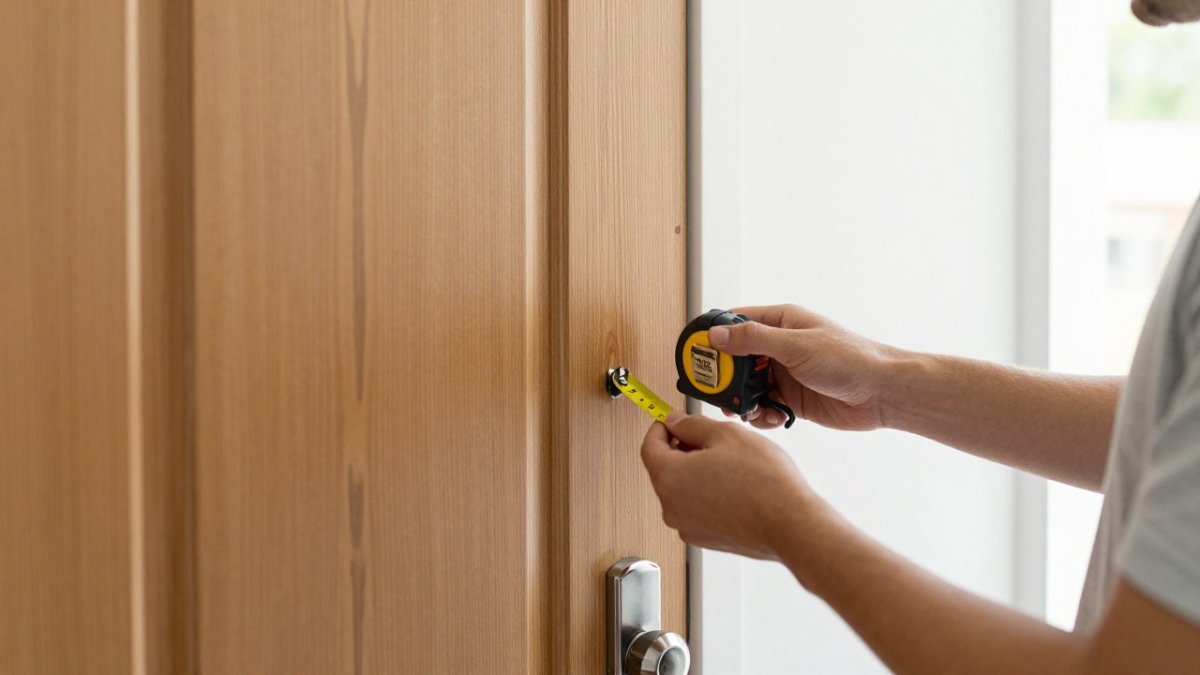
Check these details on your current front door:
- Door thickness: Most smart deadbolts are designed for standard residential doors, typically 1-3/8 inches to 1-3/4 inches thick. Confirm the range listed for each model.
- Backset: Measure from the edge of the door to the center of the existing bore hole. Common backsets are 2-3/8 inches and 2-3/4 inches.
- Bore hole and cross-bore: Look for the existing hole sizes and whether the lock uses a standard 2-1/8 inch bore.
- Existing deadbolt style: Some smart locks are a full replacement, while others fit over an existing deadbolt. Retrofit kits can save time but may not suit every door.
- Door material and frame: Solid wood, steel, and fiberglass doors behave differently. A weak or warped door frame can limit how much any lock can protect you.
Also confirm whether the lock works with the existing strike plate and whether it needs a Wi-Fi bridge or hub. A mismatch here is one of the most common reasons people return a smart lock.
Comparison: Top Smart Locks for a Front Door
Two models are commonly considered for front-door use. The right choice depends on the features you value and the door you are working with, so compare them on the specifications that actually affect front-door performance.
We recommend comparing them on the following points before you decide:
- Connectivity options, including Wi-Fi, Bluetooth, and smart-home compatibility
- Keypad design and whether it suits outdoor exposure
- Availability of a physical key backup and the keyway type
- Access management features such as guest codes and activity logs
- Installation requirements, including whether a professional should fit it
- Battery type, expected battery life, and low-battery warning method
- Stated deadbolt security grade and finish options
Schlage Encode Plus Pros and Cons
The Schlage Encode Plus is built around Wi-Fi connectivity and a keypad, with a fingerprint reader on some configurations. It suits homeowners who want remote access and detailed access logs without adding a separate hub.
Pros:
- Built-in Wi-Fi, so remote locking and unlocking work without a bridge
- Supports temporary guest codes and scheduled access
- Includes a physical key backup with a conventional keyway
- Compatible with major smart-home platforms for voice control and routines
Cons:
- Requires careful door-fit checking before purchase
- Battery and connectivity setup take more time than basic keypad locks
- Price can be higher than simpler keypad models
- Fingerprint availability varies by configuration, so confirm before ordering
Best for: Homeowners who want app control and detailed access records without extra hardware.
Yale Assure Lock 2 Pros and Cons
The Yale Assure Lock 2 is a keypad-focused option that supports app control through a compatible bridge or module. It is often considered for its straightforward keypad layout and everyday ease of use.
Pros:
- Simple keypad operation for family members and guests
- Supports guest access and access management through the app
- Physical key backup remains available on keyed configurations
- Modular design lets you add connectivity after purchase
Cons:
- Full app and remote features depend on the connectivity accessory you choose
- Weather exposure should be checked for your specific installation
- Not every door fits without adjustment
- Battery life varies with how often remote features are used
Best for: Households that want keypad entry as the main way in, with optional app control.
| Feature | Schlage Encode Plus | Yale Assure Lock 2 |
|---|---|---|
| Primary entry method | Keypad, app, fingerprint on some models | Keypad, app with bridge |
| Remote access | Built-in Wi-Fi connectivity | Requires connectivity accessory |
| Guest codes | Yes | Yes |
| Physical key backup | Yes | Yes |
| Smart-home integration | Works with major platforms | Works with major platforms via module |
| Battery type | Standard AA batteries | Standard AA batteries |
| Best for | Remote access and logs | Keypad-first households |
Confirm the exact model number before ordering, because feature sets differ between configurations of the same product line.
Schlage Encode Plus product specifications Yale Assure Lock 2 product specifications
Security, Forced-Entry Resistance and Choosing Door Locks That Prevent Break-Ins
A smart lock is only as strong as its bolt, strike plate, and door frame. Many buyers focus on the keypad and overlook physical resistance. Look for a deadbolt with a recognized security grade and check the manufacturer's stated resistance to forced entry.
Keep these points in mind:
- Industry standards from ANSI and BHMA rate deadbolts by grade. Read a homeowner's guide to high-security locks for a breakdown of what these ratings mean.
- A strong lock can still fail if the strike plate is attached with short screws into a soft door frame. Upgrade to high-security lock installation for bump-proof and drill-resistant options.
- Bump-proof and drill-resistant features help, but they are not a guarantee against determined entry.
- Electronic features such as auto-lock and tamper alarms add protection when they are enabled and tested.
If break-ins are a concern, a professional can assess the whole entry point, not just the lock.
Watch out: A keypad code that is easy to guess, or one shared widely, undermines even a high-grade lock. Change default codes on installation day.
Keypad, Physical Key Backup and Power Outage Scenarios
Smart locks run on batteries, so a dead battery is a real scenario to plan for. Most models warn you with a low-battery alert, but that warning may appear days or weeks before the lock fails. Replace batteries on a schedule rather than waiting for the alert. This section covers what actually happens when power, batteries, or your phone fail, and how to test each fallback before you need it.
Plan for these situations:
- Dead battery: Keep a physical key in a secure location, and know whether the lock has an external battery contact for emergency power. Some keypad locks offer an emergency battery contact on the exterior. Confirm whether your model uses this method or relies solely on the key override.
- Forgotten code: Know how to reset the keypad with the manufacturer's procedure, and keep the admin code in a safe place. Most locks require the admin code or the app to add or delete user codes, so losing it can mean a factory reset.
- Phone unavailable: Confirm you can still unlock with the keypad or the key if the app stops working. Test this by turning off your phone's Bluetooth and Wi-Fi and trying the keypad, so you know the fallback works before an emergency.
- Power outage: Battery-powered locks keep working during a grid outage, but any Wi-Fi-dependent remote features may not. If your lock relies on a hub or bridge plugged into wall power, remote access stops when that device loses power even if the lock battery is fine.
- Auto-lock behavior: Some locks re-lock automatically after a set delay. Know the delay and whether it can be adjusted, so the door does not lock behind you while you are carrying groceries.
Test each method once after installation. A lock you have never tried in a lockout is harder to use when you are stressed. A practical routine is to test the key override, the keypad code, and the app unlock on the same day, then repeat the key override test every few months as part of battery maintenance.
Watch out: A physical key stored inside the house or in a lockbox whose code is written on the lock defeats the purpose. Keep the backup key somewhere secure and separate from the entry, and tell one trusted person where it is.
If you are locked out and the fallback methods fail, a professional locksmith can open the door without damaging the lock in most cases. Our team at Abra Key Dabra Locksmith Services handles residential lockouts and can also review your lock's emergency-entry setup so you are not caught off guard.
Weather Exposure, Privacy and Account Recovery
Front doors face rain, sun, cold, and humidity. Look for an IP rating or a manufacturer statement about outdoor use. Keypads exposed to direct sun can fade over time, and poorly sealed electronics can corrode in damp climates.
Privacy and account security matter as much as physical security. A smart lock tied to a cloud account is only as safe as that account. Use a strong, unique password, turn on two-factor authentication where offered, and remove access for former guests or household members. Confirm what data the lock app collects and how account recovery works, so you are not locked out of your own home if you lose access to your phone or email.
Professional Installation and Scheduling Your Smart Lock Upgrade with Abra Key Dabra
Many smart locks can be installed with basic tools, but a professional installation avoids the most common mistakes: incorrect bore alignment, a loose strike plate, or a lock that binds in the frame. Our mobile lock replacement service brings the installation to your door. If your door needs adjustment, or you want the lock combined with a higher security upgrade, a licensed locksmith can handle it in one visit.
Abra Key Dabra Locksmith Services is a licensed and insured locksmith serving the Evansville area. For current availability and a quote specific to your home, contact us directly.
Frequently Asked Questions
What is the best smart lock for a front door?
No single smart lock suits every front door. The best choice depends on your door thickness and backset, whether you want a keypad or a fingerprint reader, whether you need a physical key backup, and how much you plan to spend. Many homeowners start by confirming their door fits a retrofit or full replacement lock, then compare ANSI/BHMA grades, connectivity options and warranty terms. Contact a licensed locksmith for a quote tailored to your home.
Are smart locks safe for the front door?
Smart locks can be as secure as traditional locks when they are installed correctly and kept updated. Security depends on the deadbolt grade, the strength of the lock cylinder, the quality of the door frame and the account protections you enable, such as two-factor authentication and strong access codes. Review the activity log regularly and remove guest codes you no longer need. A professional installation helps ensure the strike plate and door alignment support the lock.
Should I choose a smart lock with a physical key?
A physical key backup is useful if the battery dies, the keypad fails, or your phone is unavailable. Many smart locks include a standard key cylinder for this purpose. If a lock has no physical key option, plan for another way to get in, such as a backup battery terminal or a locksmith. Keeping a spare key with a trusted neighbor or in a secure location is another common approach. Ask about the backup method before you buy.
Can a locksmith install a smart lock on my front door?
Yes, a professional locksmith can install most smart locks and check that the door, backset and strike plate are properly aligned. Professional installation reduces the risk of a poor fit that weakens the door.
